UI/UX & Brand Design

Create a lasting connection with your users with expertly crafted UI & UX Designs.
From concept to refinement, I craft intuitive UI/UX designs that feel great to use and make your product stand out.






What is UI/UX?
UI/UX stands for User Interface (UI) and User Experience (UX)
Both are things I genuinely nerd out on, because a product that works but feels clunky to use is a product people quietly stop using.
- User Interface Design focuses on the visual and interactive elements, like buttons, colors, and layouts.
- User Experience Design ensures the journey through your product is smooth, efficient, and satisfying for users.
Together they're what makes the difference between a product people enjoy and one they just tolerate.
Key Benefits of Good UI/UX Design
- Stronger First Impressions
- Impress users immediately with clean, professional designs that build trust and credibility.
- Higher User Engagement
- Intuitive navigation and delightful interactions keep users coming back for more.
- Improved User Retention
- A seamless experience prevents frustration, encouraging users to stay longer.
- Boosted Conversions
- Well-designed interfaces and user flows drive higher sales, sign-ups, or other goals.
- Brand Loyalty
- Design that resonates emotionally fosters long-term relationships with your audience.

Want to learn more about how to design professional grade UI/UX
Download our Free UI/UX Design Guide
and Master the essential steps to design a succeful web application that delivers exceptional user experiences, meets your business goals, and supports long-term growth?
The UI/UX Design Process
Every design I work on follows the same structured stages so nothing is guessed at. The end result looks intentional because it is.
Steps in the UI/UX design process
- Step 1. Ideation and Research
- Define user needs and business goals using research methods like surveys and competitor analysis to set a strong foundation for purposeful design.
- Step 2. Wireframing and Prototyping
- Create basic layouts and interactive prototypes to plan structure, test user flows, and validate ideas before moving to detailed design.
- Step 3. Visual Design
- Apply colors, typography, and branding to craft a polished, accessible interface that aligns with your brand and enhances user experience.
- Step 4. Usability Testing
- Test designs with real users, identify pain points, and refine the interface to ensure it’s intuitive and meets user expectations.
- Step 5. Development Handoff
- Since I also build what I design, handoff is seamless. No lost-in-translation moments between design and code.
- Step 6. Launch and Continuous Improvement
- Post-launch, monitor user behavior, collect feedback, and refine the design to keep it relevant and user-friendly.

Ready to get started with your UI/UX designs?
CASE STUDIES
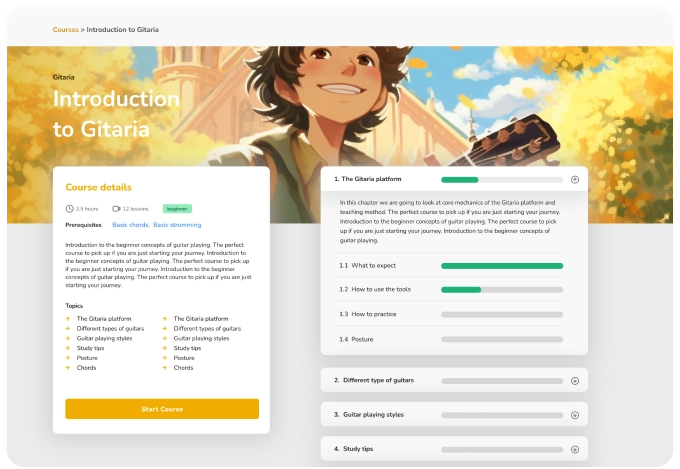
Gitaria
Guitar Learning Platform utilising Smart Learning (AI), Gamification, and Community Support
Developed an engaging, feature-rich web and mobile app to revolutionise guitar education. Gitaria combines traditional music theory with modern learning techniques like AI assisted learning, spaced repetition, gamification, and community-based feedback, offering a complete and interactive experience for students of all levels.

Recipro
Personalized Recipe Companion with Smart Recommendations and Meal Planning.
Designed a mobile app that elevates the cooking experience by offering personalized recipe recommendations based on user preferences, dietary restrictions, and available ingredients. Integrated features include a smart shopping list, meal planning, and nutrition tracking. The app optimizes the cooking process through intuitive user flows and engaging UI.
Ready to get started with your UI/UX designs?
Wybit


Prague, Czech Republic
Amsterdam, The Netherlands